Blazer Book Link – Course Materials Program prepares Elms College students with access to their required materials by the start of classes.
Through this program, the campus store prepares and delivers all students’ required materials for them, so they can begin the semester equipped with what they need to succeed. Designed for flexibility and convenience, this digital-forward program equips students with their required digital materials directly in Moodle, allowing them to study on their schedule—whether they’re on a laptop, tablet, or smartphone. With features like highlighting, note-taking, and keyword search, Blazer Book Link make it easy start the semester prepared, and digital access in Moodle allows students to be organized and engaged throughout the semester.
Through Blazer Book Link – Course Materials Program, students will also benefit from receiving affordable course materials, with up to 60% savings, thanks to publisher negotiations and bulk purchasing power. And, with affordable and consistent program pricing, students can also effectively budget for their course materials, with no surprise costs, and can easily pay for the program on their student account each term.

Key benefits include:
- Convenience – all required materials are prepared for you by the campus store.
- Access – one-click access to digital materials in Moodle.
- Digital Forward – priority to deliver required materials digitally in a paperless format, physically provided when digital isn’t available.
- Consistency – seamless integration with online learning platforms.
For program information, check your .edu inbox for emails related to the program, visit Follett – our campus store provider’s website, speak with experts at the campus store, or log in through your campus store portal.
Blazer Book Link Program FAQs
Note: Connect with your campus store team, check your campus’s website, or visit the Customer Support Center for more information on your campus-specific exclusions, program changes, and details not covered in these FAQs.
How does the Blazer Book Link program work?
The Blazer Book Link Program take the hassle out of getting course materials by providing students with convenient access to their required materials for the lowest price available. Your campus has an opt out model and includes both digital and physical materials.
Follett, our campus store provider, works on behalf of the campus to negotiate required material prices with publishers down to the lowest possible price. Follett then works with the campus store to ensure all required digital materials appear in the student’s Moodle and all required physical materials are prepared for pickup by the first day of class, as applicable.
All students are automatically enrolled in the program, and students who are not interested in the material savings can opt out of the program each term with no penalty. Students who opt out of the program are responsible for finding and purchasing their own required materials.
How am I notified about the program?
Faculty will be notified at the point of adoptions and students will be notified at the point of course registration. Additionally, all participating students and faculty will receive communications to their school email address providing them with all necessary program information including deadlines, fees, and how to opt out/opt in as available. Be on the lookout for the following emails with the following subject lines:
- Kortext | Your New Materials from… | Faculty
- Important Information Regarding your Course Materials for the Upcoming Term | Faculty & Students
- Welcome to Blazer Book Link | Students
- Your Order is Ready for Pick-Up | Students with physical materials
What are the Program Benefits?
- Faculty can begin teaching on day one of classes as all students are prepared with their correct materials.
- Required course materials are available digitally in the student’s Moodle by day one of class, with no waiting in line with heavy books.
- Easy access and management of digital course materials in the student’s Moodle.
- Reduced student stress related to finding and purchasing the correct course materials in time for the start of classes.
- Digital platforms offer key features such as: highlighting, flash cards & note-sharing, leading to greater success in the course.
- Up to 60% lower than equivalent pricing for required course materials.
Will students save money?
Yes! Students can save up to 60% off the original price thanks to the campus store’s relationships with publishing partners and bulk purchasing power. The program also reduces student stress during the purchasing process and provides a method to easily access, manage and use all course materials regardless of format or cost.
How do students get their required course materials?
Once the student registers for their courses, the student is automatically enrolled in Blazer Book Link and the campus store will get all their required materials for that course ready for them! Students will receive confirmation emails to their school account sharing details to access their digital materials in the Moodle, as applicable. If the student has physical materials, the campus store will communicate with them when they can pick up these materials, as applicable.
Students will find this information in the emails, as applicable:
- Important Information Regarding your Course Materials for the Upcoming Term | Faculty & Students
- Your Order is Ready for Pick-Up | Students with physical materials
What type of materials will students receive?
Depending on the classes and the course materials required, students may receive a combination of digital course materials, physical textbooks, printed lab manuals or workbooks. Please note, nursing software and suggested materials are not included in the program.
How do I get my course materials that aren’t included in the program?
Only required digital and/or physical materials for courses are included. For suggested, recommended, or other course materials, you can order these materials online or visit the campus store where textbook experts will be happy to assist you.
What is the difference between “Required” and “Recommended” course materials, and which is included in the program?
- Required: it is necessary for the course.
- Recommended: the instructor has suggested an item that may be helpful.
Only materials identified by the faculty as “required” are included in the program. All “recommended” materials may be available for purchase separately at the campus store.
Will this affect faculty’s textbook selection or academic freedom?
No. Faculty still retain full academic freedom and can choose the materials used in their courses.
What if a student adds or drops a course?
If a student adds or drops a course, that information is automatically transmitted to the campus store.
- Added courses: Within 24 hours of adding a course, students will receive an email at their school email address with details to access their digital materials directly in Moodle. If the course requires physical materials, students will receive an email to their school email address letting them know when the new print materials are ready for pick-up.
- Dropped courses: For courses dropped prior to the last day to drop/add/opt-out/opt-in deadline, access to electronic or digital materials will be automatically disabled. If the course requires physical materials, they must be returned to the campus store unless otherwise stated.
Opt-out deadline for Fall 2025: September 9th, 2025
Is the program mandatory, or can students opt-out of the program?
All students are automatically enrolled in the program once they register for their courses. Students may choose to opt out and remove themselves from the program before the opt-out deadline each term for a full refund. If a student opts out, they are then responsible for finding/purchasing their required materials independently. Students must take action to opt-out of the program each term. There is no penalty for opting out.
What if a student opted-out/opted-in by mistake or changed their mind?
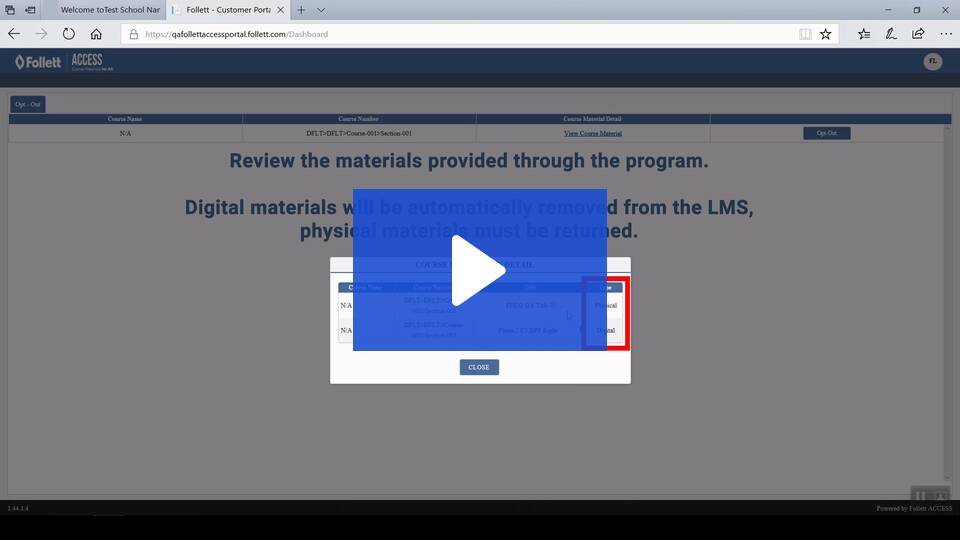
If the opt-out/opt-in period has not ended, students can opt back in/out by going to the opt-out portal and choosing “opt-in”/“opt-out”. They can login to the opt-out portal by clicking the opt-out link, which is also sent to their student email address.
For a demonstration of how to opt out, watch this video.
Do students get to keep their materials at the end of each term?
Required physical materials can be kept by the student at the end of each term and do not have to be returned. Digital materials can be accessed for a minimum of 180 days and may be available for a longer period of time based on the material adopted and the publisher’s terms.
How do I access my required digital course materials?
Students participating in the program will have their required digital materials available directly in Moodle. Students will receive emails from no-reply@kortext.com with instructions and details on accessing their materials. For any technical issues and additional support, students can email support-us@kortext.com.
For self-help articles and resources, visit the Kortext help site.
For self-help and additional assistance, use our support resources below:
- Kortext Help Site
- Kortext Introductory Video
- Email: support-us@kortext.com
- Visit: the campus store to speak with our Blazer Book Link experts.
Beyond Course Materials:
You have your course materials. What’s next? Your campus store has the best selection of officially licensed campus gear around. We are ready to outfit you head to toe, with school spirit. Visit your campus store to grab all your spirit items, supplies and technology and meet your friendly campus store staff who are a knowledgeable resource to help you throughout the term.
Where do I go if I need more assistance?
If you need more assistance, you can find additional resources, support articles, and self-help tools, on our customer support page here: Customer Support Center. You can use our friendly chatbot in the bottom right of the page to be guided through tools for your specific questions.